Mahima Shastry
Lineage / UX case study / 2026 15 min read

Lineage

Creative Lineage Canvas - Recover the shadow. Keep the progress.

Creative Lineage Canvas helps a designer bring back an earlier approved element while keeping the rest of the poster as it is today.

View tutorial/prototype (opens in a new tab)

An independent desktop UX concept for small creative teams working with a mix of manual edits and AI-assisted artwork. The central question: can a recovery show its consequences clearly enough for someone to trust the next click?

Role and format
UX design and prototyping; independent concept with AI-assisted research and implementation.
Time and scope
45 days and three tracked elements.
Result
A working recovery flow that preserves unrelated work and marks the recovered result.
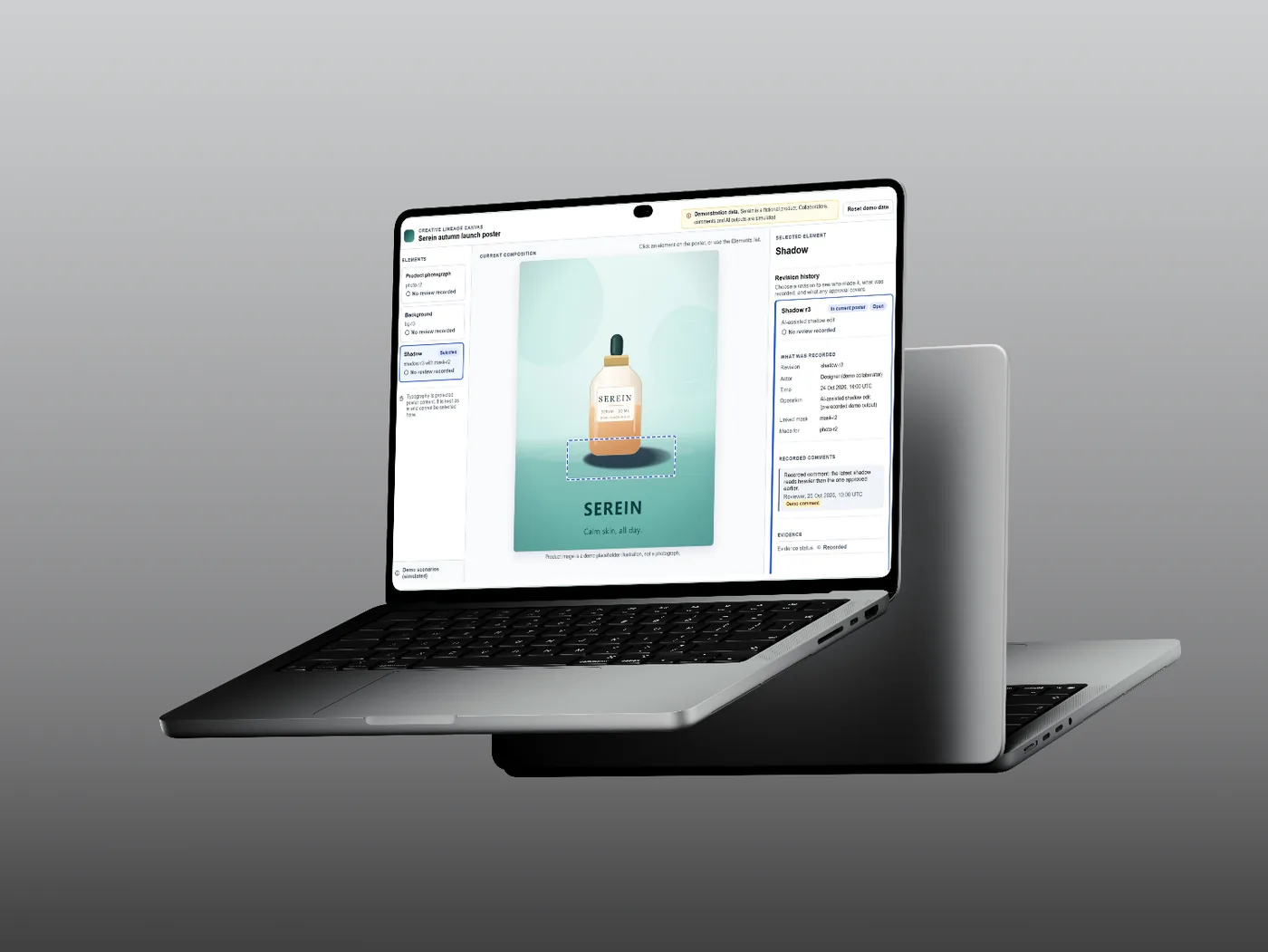
Lineage prototype
Understanding the problem

One small shadow with several consequential decisions.

A designer working on a project wants an older shadow. However, the current photograph, background and wording need to stay.

In the Serein demo scenario, a manually refined shadow was approved in an earlier poster. A later AI-assisted edit made it heavier. Meanwhile, other parts of the poster changed. Restoring the whole earlier poster would also replace work the designer wants to keep.

PS: Serein is fictional. Its collaborators, comments, approvals and AI outputs are purely demonstration records. The scenario exercises a design hypothesis; it is not a client incident or a participant story.

Part of the posterEarlier approval contextCurrent state
Product photographphoto-r2photo-r2 - unchanged
Backgroundbg-r1bg-r3 - keep this
Shadow + maskshadow-r2 + mask-r1shadow-r3 + mask-r2 - replace together
TypographyEarlier wordingCurrent wording - keep this

The problem I chose to solve

The aim of this product is to help someone identify the right recorded element, understand what its approval covered, and predict what recovering it will change.

Selective restoration already exists. The open UX question is whether bringing this decision context together makes recovery clearer.

An example of what a successful recovery must preserve

  • The chosen shadow must return with the mask it needs.
  • The current photograph, background and typography must remain intact.
  • Earlier versions and approvals must stay in the record.
  • The new result must be clearly marked for review.
Two terms to know:

A revision is a saved version of one element. A mask controls where artwork is visible. Here the shadow relies on a particular mask, so recovering one without the other could change its appearance.

Secondary research

Checking whether this problem already has a solution.

I used a desk review to narrow the opportunity.

The project research combined the following:

  • Original HCI papers
  • Official product documentation,
  • Provenance guidance and public workflow reports.

I asked how people reuse earlier work, what existing tools can restore, and where a recovery can become difficult to predict.

EvidenceWhat it changed in the designLimit
Selective undo research In Aquamarine's initial nine-person study, six expected frequent use and three said layers or saved files were sufficient. [P1]Retain selective recovery as a question worth exploring, and include competent existing workarounds.Small 2015 study; not current demand evidence for agencies.
Creative version control 18 interviews explored how practitioners use versions as reusable material. [P2]Organize around a selected element and its reusable revisions.Cross-disciplinary sample and not an AI campaign-team study.
HistoryPalette Prior research supports previewing and reusing earlier image alternatives in place. [P3]Narrow the concept to approval scope, required assets and preservation information.Close prior art plus in-place history reuse is not a new Invention.
Provenance guidance A history record does not settle whether an assertion is true. [P6]Keep recorded facts, collaborator declarations and unknowns separate.No C2PA verification is implemented in this prototype.
Reasonable conclusion

The evidence makes this a credible design investigation. It does not tell me how often small agencies face the scenario, how costly it is, or whether they would adopt a separate recovery workspace.

Existing workflows

Selective recovery did not start here.

Existing approachWhat it already supportsQuestion for Lineage
Photoshop History Brush [P4]Paint selected areas from an earlier state or snapshot while keeping other edits.Can a recovery surface approval context and linked-asset consequences alongside the visual result?
Photoshop cloud versions [P5]Open an older version separately, compare it and extract elements without replacing the working document.Is the combined decision view clearer than an experienced designer's existing extraction workflow?
Layers and saved copies [P1]Provide familiar ways to preserve alternatives and reuse earlier material.Does the extra recording and review structure earn its place in the workflow?
HistoryPalette [P3]Organizes earlier image alternatives and supports in-place preview and reuse.Can explicit approval scope, dependencies and preserved content improve comprehension?

The opportunities

I brought three questions into one interaction:

  • Is this the revision I want?
  • What else must come with it? What will remain as it is?
Empathise

Designing for the job

Two proto-personas describe the work and the approval relationship.

Primary proto-persona - The campaign designer

ContextDesign implication
Produces campaign visuals in a small agency or studio, mixing imported artwork, manual edits and AI-assisted outputs.Make selection visual and direct. Keep the current poster visible during comparison.
Needs to recover an earlier element while retaining later improvements elsewhere.List what changes and what stays before applying a recovery.
May not have complete records of how every asset was made.Expose gaps rather than inventing origin, authorship or tool information.

Secondary proto-persona - The creative lead or reviewer

ContextDesign implication
Reviews work created by someone else and needs to know what was approved.Attach the reviewer, date, comment and composition context to the relevant revision.
May encounter the same element in a changed composition.Keep the earlier approval in its original context. Mark a recovered copy Needs review.

The shared job to be done

When I need an earlier approved element, help me identify it and see the effects of recovering it, so I can keep later work and make an informed choice.

Define

Turning uncertainty into design questions.

The “How might we?” question

How might we help a designer recover a previously approved element while understanding its dependencies, evidence gaps and effects on the current composition?

Supporting questionResponse in the prototypeEvidence status
How might we show an older element in today's poster?Compare the chosen revision in the current composition without saving.Informed by history-reuse research; implementation checked.
How might we prevent an old approval from looking like a new one?Show the earlier approval context and require review of the recovered revision.Project hypothesis; comprehension untested.
How might we reveal an invisible dependency?Explain that the shadow and its mask must be copied together.Informed by dependency concerns; rule checked.
How might we remain useful when evidence is incomplete?Show unknown fields, name the block reason and provide an honest next step.Evidence-boundary principle; usefulness untested.

Three principles that guided the trade-offs

  • 1Make scope visible. The designer should be able to say what changes and what stays.
  • 2Keep history accountable. New work gets a new revision; earlier approvals and records remain attached to their sources.
  • 3Prefer an explicit stop to a silent substitution. If required artwork is missing or incompatible, explain why recovery cannot proceed.
Ideate

Explaining and verifying four ways back.

ApproachAppealReason for the decision
Restore the whole posterA familiar file-level rollback.Too broad for this task as the designer wants the latest background, photograph and wording.
Replay earlier operationsCould reconstruct a state from its edit history.Requires reliable, complete operations and a consistent account of their dependencies. This prototype does not promise that.
Ask AI to recreate the old shadowCould produce a visually similar result.Similarity cannot establish that it is the stored, previously reviewed artwork. It would need to be treated as new generation.
Copy the recorded snapshot ChosenUses known stored artwork and creates a new, inspectable revision.Fits the bounded task and requires available source material and compatible dependencies. Otherwise, it must refuse.

The cost of the chosen approach

The prototype cannot automatically recover separable elements from flattened or unrecorded artwork. Its fallback is to choose another recorded revision or redo the work manually in the editor. It explicitly says that this prototype has no branch editor.

Scope was also a design decision

I kept one end-to-end poster scenario:

  • Three selectable elements
  • Revision inspection, comparison
  • Recovery preview, apply, undo and reproducible failure states.
  • The mask remains a dependency rather than a fourth primary element and typography is the protected content.

PS:Live AI generation, accounts, multiplayer editing, cross-app capture and broad rights management were deferred. The prototype demonstrates the recovery decision, not a full creative suite.

Information architecture

Choosing the piece. Reading its story.

AreaUser questionWhy it is here
Elements listWhich part am I working on?Three explicit choices also provide a keyboard alternative to clicking the poster.
Composition canvasWhat does it look like in today's poster?Keeps the surrounding design visible when an earlier revision is compared.
Revision inspectorWhat changed, what is known and what was approved?Opens one revision card at a time to limit competing detail.
01
1 Select and inspectChoose an element, then open a revision and read its recorded history.
02
2 Compare in contextView the earlier shadow inside the current poster. Nothing is saved.
03
3 Preview the consequencesRead what changes, what stays, what must travel together and what needs review.
04
4 Recover or keep the current versionApply creates new revisions and a receipt. Cancel keeps the saved scene unchanged.
05
5 Undo if compatibleCreate another revision that restores the previous appearance without deleting the recovery.
Solution: inspect

“Not recorded” is a useful answer.

Selecting Shadow exposes its revisions, actor, time, operation, recorded comments and linked mask.

The current revision records an AI-assisted edit, while the tool name was not captured.
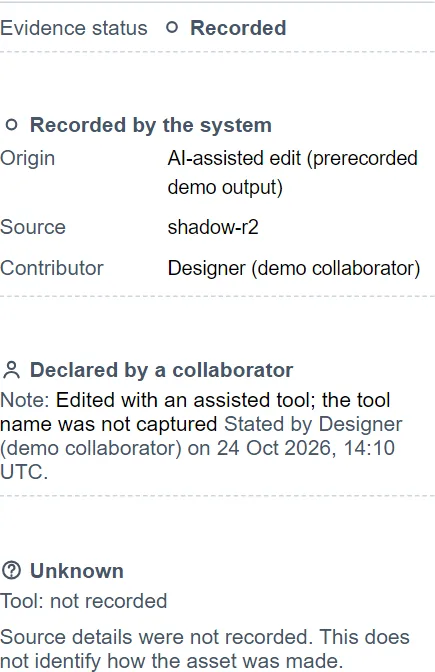
Actual evidence block from the supplied standalone demo. The tool name remains visibly unrecorded.

Why three evidence groups?

  • Recorded by the system identifies captured metadata.
  • Declared by a collaborator identifies a person's statement.
  • Unknown identifies what the record cannot answer.

This avoids turning a collaborator's declaration into a verified fact, or an absent tool name into a guess about how the artwork was made.

Why the mask is not another main selection

The user is trying to recover a shadow. The mask matters because that task depends on it. Showing the mask as required supporting material preserves the relationship without asking the designer to manage a separate top-level recovery.

Solution: approval

Approving has an address. It stays there.

The older shadow was reviewed alongside an earlier background and wording. Reusing the same artwork in a new composition changes that context.
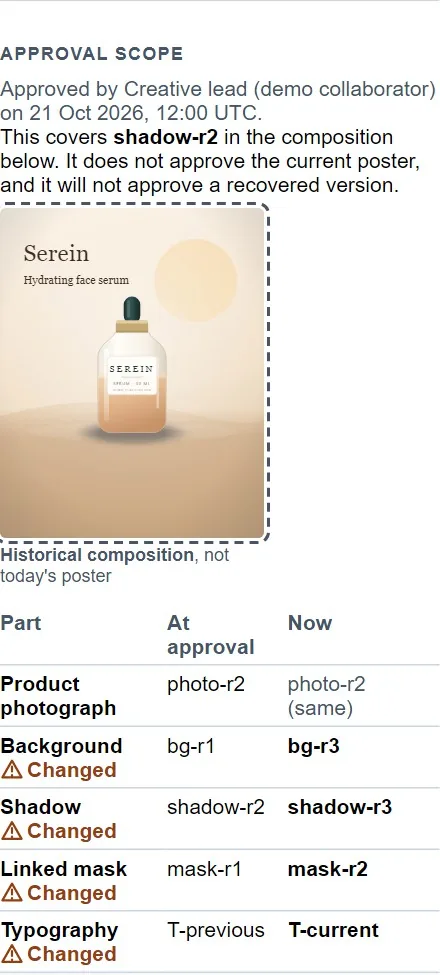
The approval block names the reviewer and date, shows the earlier poster and compares its context with today's.
DecisionKeep the original approval attached to the original revision. Every recovered copy is a new revision marked Needs review.
Why show then versus now?A context table makes the difference inspectable. A date and a green badge alone would not explain what the reviewer saw.
Accepted costEven an exact copy needs another review. This is conservative and may create overhead if a team uses a different approval model.
Solution: compare and preview

Trying it on. Then reading the consequences.

The comparison places the earlier shadow inside today's poster, using explicit controls rather than hover. A framed canvas and “Preview only, nothing is saved” message identify the temporary state. The saved composition remains unchanged.
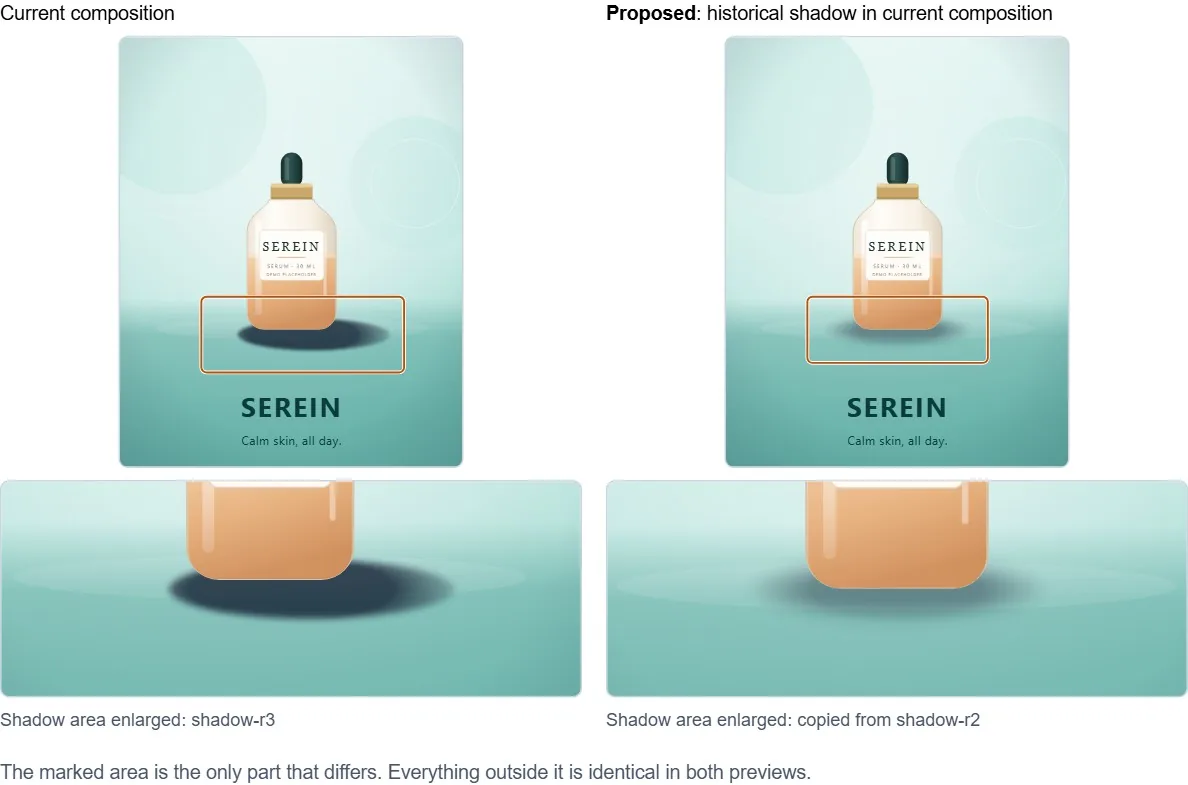
The recovery preview shows the current and proposed compositions, plus enlarged shadow details. The marked area is the only visual difference.
Preview blockQuestion it answers
Will changeWhich shadow and mask revisions will be replaced?
Will stayWill the photograph, background and typography remain as they are?
Required togetherWhy does the mask have to come with the shadow?
After recovering: Needs reviewDoes the earlier approval carry forward? No.
What is not knownWhich evidence gaps remain unresolved?

Why enlarge the shadow?

Two complete posters fit in the dialog, but the small difference was difficult to inspect. The enlarged detail makes the actual decision visible without asking the user to infer it from metadata.

Solution: recover and undo

Recovering gets a receipt. Undoing leaves a record.

Applying recovery copies the chosen shadow and its required mask into new revisions. It preserves the current photograph, background and typography; the original approval stays put.

The receipt lists the new revisions, their sources and the save time. Success appears only after the save succeeds, and the result is marked Needs review.
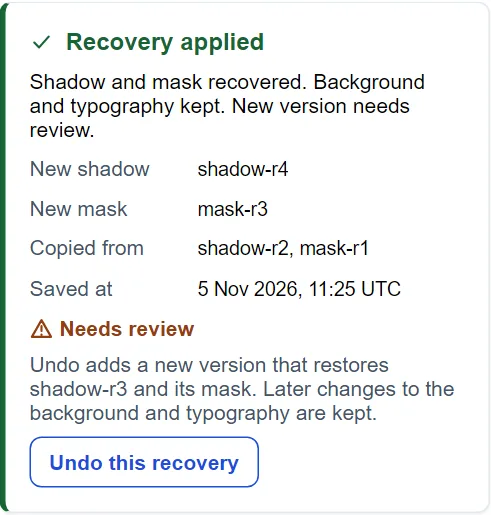
Actual recovery receipt. Its timestamp reflects this walkthrough; it is not a launch date
StateShadow / maskHistory and approval
Before recoveryshadow-r3 / mask-r2Earlier approved shadow-r2 remains available.
After recoveryNew shadow-r4 / new mask-r3Copied from shadow-r2 / mask-r1. New result needs review.
After undoNew shadow-r5 / new mask-r4Restores the prior appearance. The recovery is still recorded.

Why undo adds a version

A whole-scene rollback could remove unrelated later changes. Here undo adds a compensating revision: another saved version that restores the previous shadow and mask. The history grows rather than losing the recovery event.

The cost is an unfamiliar meaning of undo and a longer history. If the shadow, its mask or the required photograph position changed incompatibly, undo is blocked instead of overwriting that newer work.

Solution: difficult states

The “no” states are part of the design.

SituationBehaviourWhy it matters
Source artwork unavailableFlag the unavailable source and block recovery and suggest another recorded revision or manual redo.A record is not the same thing as recoverable artwork.
Required mask missingBlock the recovery rather than silently using today's mask.The result should match the stored combination.
Photograph position incompatibleBlock the shadow recovery and do not quietly restore the photograph.The designer explicitly wanted the current photograph kept.
Poster, approval or evidence changes after previewRequire a fresh preview before applying.The designer should act on the state they actually reviewed.
Saving failsShow an error, preserve the previous state and show no success.An unsaved change must not look complete.
Undo would overwrite newer dependent workBlock undo and offer a new recovery instead.Undo should not destroy later work to fulfil an earlier promise.

A deliberately conservative preview rule

Any change to the recorded scene invalidates an open preview, even when the change looks unrelated to the shadow. A more selective rule could reduce interruptions, but would need a second, reliable account of which changes affect the plan.

Iterate

The screen challenged the specification.

These iterations came from implementation and visual review. They were not findings from a user test.

Observed problemChangeReason / trade-off
A hidden-state check passed in a simulated page, while a CSS rule made the real interface visibly wrong.Check the rendered application in a browser as well as the underlying rules.A correct attribute does not guarantee the person sees the correct state.
Two full posters made the shadow difference too small to inspect in the dialog.Add enlarged shadow details alongside the complete compositions.More vertical space, but a readable comparison of the thing being recovered.
The earlier UI used nested frames, multiple resting shadows, uppercase labels and 14px body text.A documented later design pass used space and tone, 16px body text and a full-width demo notice.Reduce competing emphasis so the poster and the decision carry the hierarchy.
Making the page behind the modal inactive broke focus restoration on Escape.Remove the inactive state before returning focus to the invoking control.An accessibility improvement introduced another accessibility problem; existing browser checks caught it.

What I left open

  • The revision card may be too long.
  • The approval wording may be too subtle.
  • Undo may not match expectations.

I recorded these concerns rather than writing a successful user outcome around them. The next study should establish where people hesitate and what they believe happened.

Lineage / 14 / Accessibility

Recovery should not require a mouse.

Interaction needImplemented / checkedRemaining limitation
Choose the elementAn explicit Elements list supports keyboard selection. Selected states are exposed programmatically.The poster layers themselves have no direct keyboard path. The list is the alternative.
Operate a dialogFocus enters the dialog, remains inside, closes on Escape and returns appropriately.No screen-reader walkthrough has been run.
Understand the resultStatus messages and words such as Needs review, Will change and Unavailable supplement colour.Live-region presence is not proof of useful assistive-technology announcements.
Read at a larger scaleThe evaluation recorded no horizontal overflow at five widths, including 720px and 390px.Real devices, long content and high-contrast mode were not tested.
Avoid unnecessary motionTransitions reduce to zero with the system's reduced-motion preference.This is a specific check, not an accessibility-conformance result.
See focus and textMeasured 3px focus outlines and automated rendered-text contrast checks.Poster artwork text was excluded from the contrast scan.

Issues identified, still to address

  • The canvas hint leads with clicking.
  • The demo controls interrupt the keyboard route from element selection to history.
  • Reset is the first tab stop, with no skip link.
Accessibility status

Next: a keyboard-only walkthrough by a person, followed by a screen-reader session with actual announcements recorded. The current evidence does not establish WCAG conformance.

Next research and reflection

Test the interpretation

The prepared plan aims for five participants, with three as a useful minimum:

  • Campaign designers in small studios
  • Near-equivalent in-house designers or freelancers, and
  • Ideally one creative lead.
TaskWhat I would observeWhat would change the design
Identify recorded contributionsCan they separate captured facts, declarations and missing information?Invented authorship or missed unknowns would trigger a hierarchy and wording review.
Find the earlier approvalIn their own words, what did the approval apply to?If they read it as approval of today's poster, reassess both the wording and the element-level approval model.
Compare and recoverDo they know nothing is saved during comparison, what stays, and why the mask is included?Mistaken change scope would trigger a preview-layout and feedback iteration.
Encounter a blocked recoveryCan they explain the reason and name an available alternative?Confusion or self-blame would trigger an error-message and fallback review.

Measure understanding before speed

  • Record unaided completion, hints, misattribution
  • Approval-scope comprehension
  • Unexpected-change beliefs and hesitation.

What I would carry forward

The useful part of this project is connecting a rule to a consequence a person can inspect. The shadow is small; the decision around it is not. My next step is to watch someone make that decision, then change the design where their understanding and the system's behaviour part ways.

Next up HalO

An SOS you can start with your phone in your bag.

Read it All five projects